
Pool workspace (Overview, Settings, DNS, DR, Monitoring)
Pool workspace
The pool page has a tab bar with three groups:
- Overview (pool home)
- Member tabs (one per enrolled host)
- Pool tools (DR, Monitoring, Settings, Managed DNS)
Overview tab
For HAProxy pools, Overview answers:
- Is traffic on the active node?
- Are standbys ready?
- Will DNS move if HAProxy or the agent fails?
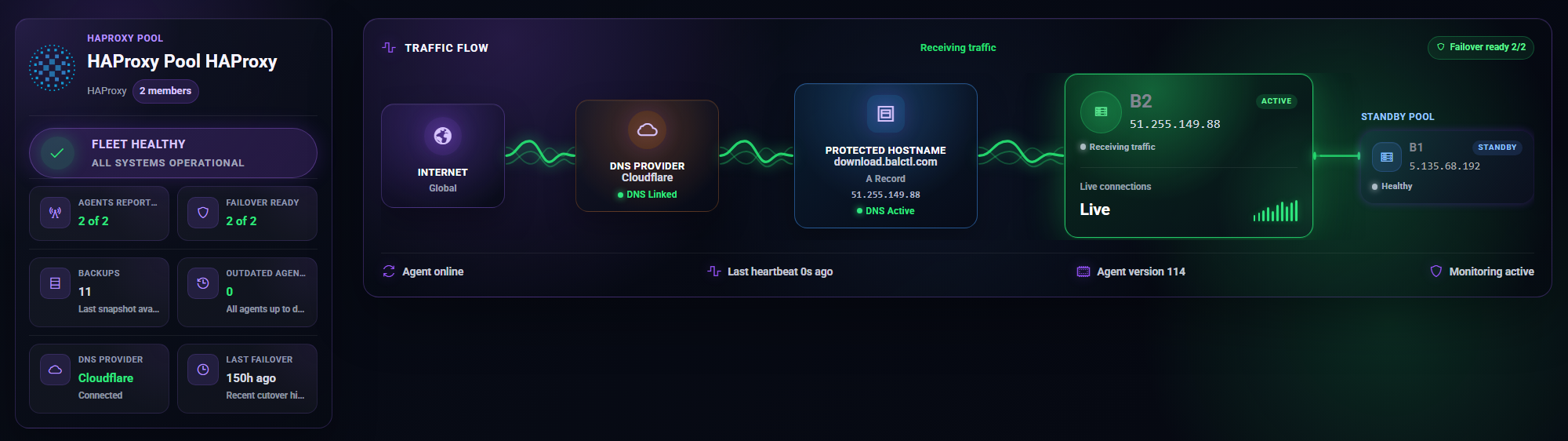
Hero panel: Traffic-flow diagram — Cloudflare/DNS → active HAProxy → standbys.
Actions:
- Add member
- Cut DNS to standby — manual DNS cutover to next ready standby (requires connected DNS)
- Settings shortcut
KPI tiles: healthy members, failover-ready count, backups, cron jobs, last failover time.
Member cards show Active vs Standby, heartbeat state, and Make active on standbys.
Settings tab
Failover hostname, proxied vs DNS-only, and Dynamic DNS sync live on the Managed DNS tab (not only Settings).
Managed DNS tab
- Failover DNS label and FQDN preview
- Orange cloud vs DNS-only
- Dynamic DNS sync — optional; updates A record when active member’s public IPv4 changes on heartbeat
- DNS connectivity test
- Current A record target IP
Disaster Recovery tab
Visible when the pool has 2+ members (HAProxy preset only).
Cross-member restore: Pick a target member, choose a snapshot from another host’s backups, restore scoped HAProxy files onto the target.
Requires Pro or active trial for cross-member restore.
Monitoring tab
Pool-wide alert settings and failover notification preferences (email when auto-failover promotes a standby).
Per-member monitoring is under each member’s Monitoring tab.
Protection tab
Only appears when 2+ cPanel members exist — not core HAProxy-only pools. Document separately if you mix cPanel hosts into an HAProxy pool.