Linux Server Pools
Generic Linux Server Pools provide monitoring and management for a wide range of Linux infrastructure. They support OpenLiteSpeed, MariaDB, Galera Cluster, and other Linux-based services running on Ubuntu, Debian, Rocky Linux, AlmaLinux, CentOS, Red Hat Enterprise Linux (RHEL), and compatible distributions.
Part 1 - Overview & Concepts
What ServersCTL hosting pools are
ServersCTL (serversctl.com) is the control plane for redundant server infrastructure: enrol Linux VMs with the ServersCTL agent, monitor heartbeats, cut over DNS between peers, run stack backups, and (on the cPanel preset) orchestrate account replication and live WHM transfers.
A server pool is one deployment in your dashboard — a set of members sharing failover DNS and pool-level settings. Members run what you actually install on each host. The dashboard exposes member tabs for OpenLiteSpeed, MariaDB/MySQL, Galera, and cPanel/WHM; each tab fills in when the agent detects that stack on that server.
ServersCTL does not host traffic. It moves DNS, queues remote jobs, and calls APIs where configured.
Pool Presets
Server pools are created using a preset template in the UI. This chapter is for the Generic Linux Server Preset. For HAProxy Server Pools, see the HAProxy chapter.
What runs on a member (stack compatibility)
Do not assume one VM runs every stack. Common deployments:
Core terminology
Architecture
Failover health: missed heartbeat beyond failover delay (10–120 s). No HAProxy systemd check on hosting presets.
All Linux Servers should use the Generic Server Preset when adding a pool. Only ever select the HAProxy Preset if HAProxy is installed on your server.
Create a Generic Linux pool
-
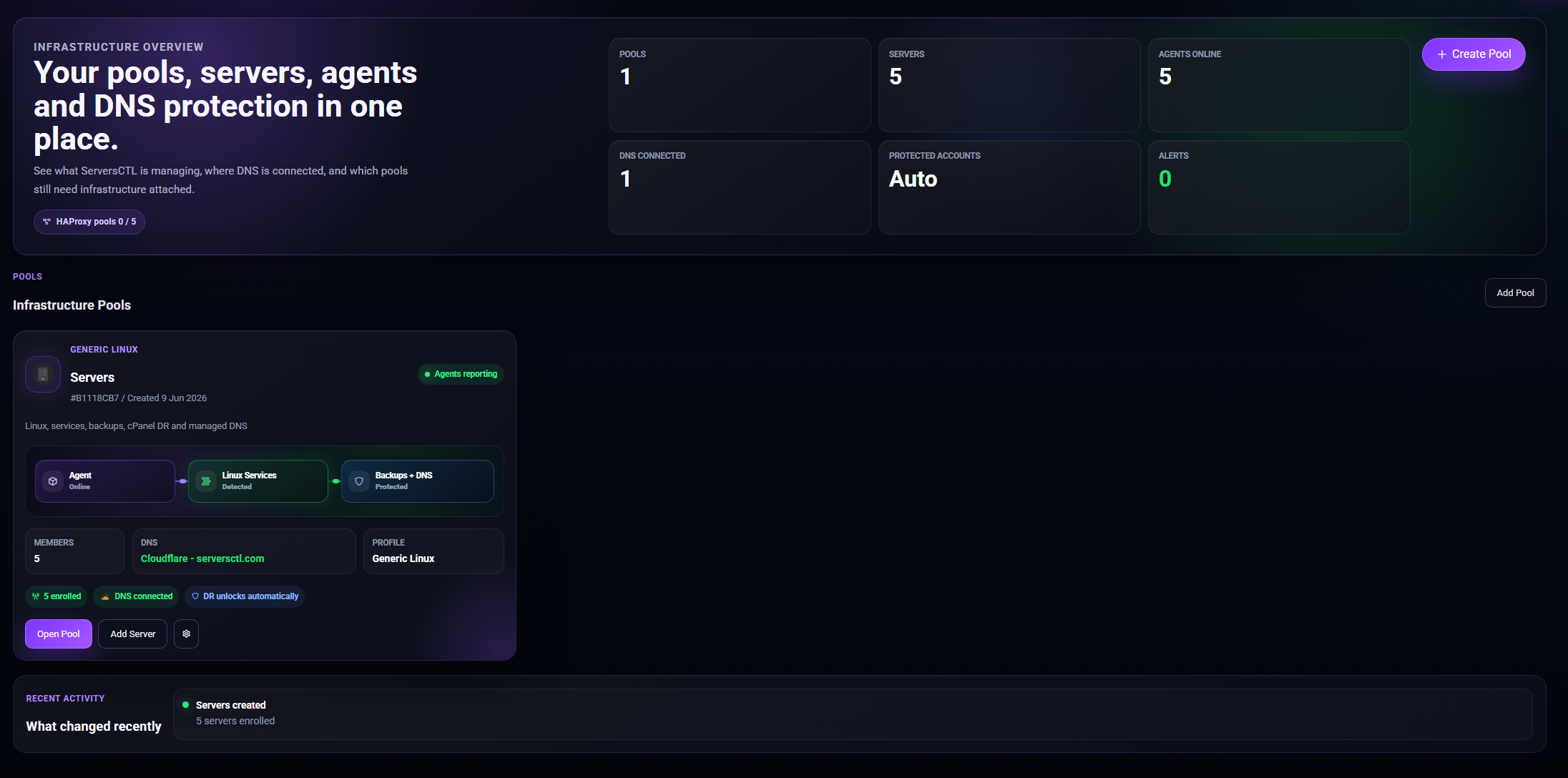
- Sign in at serversctl.com → Pools → Create Pool.
-
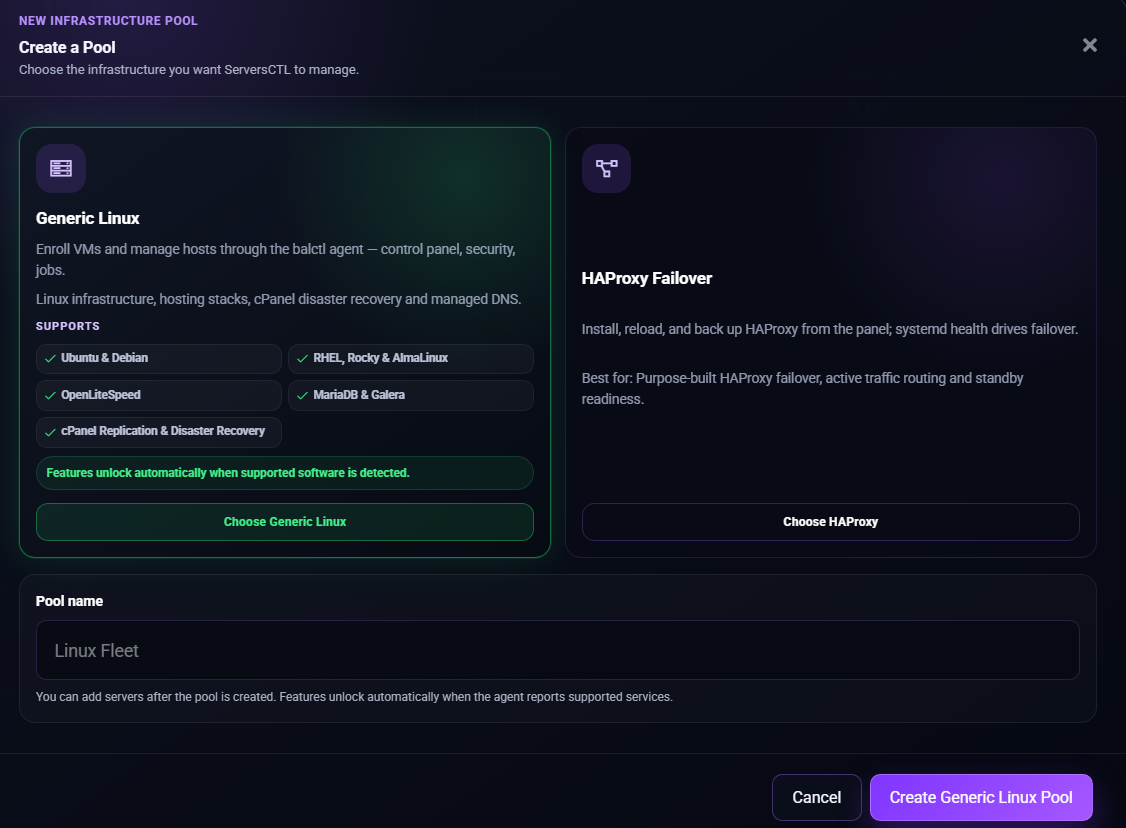
- Configuration preset: Generic Linux servers.
-
- Name the Pool.
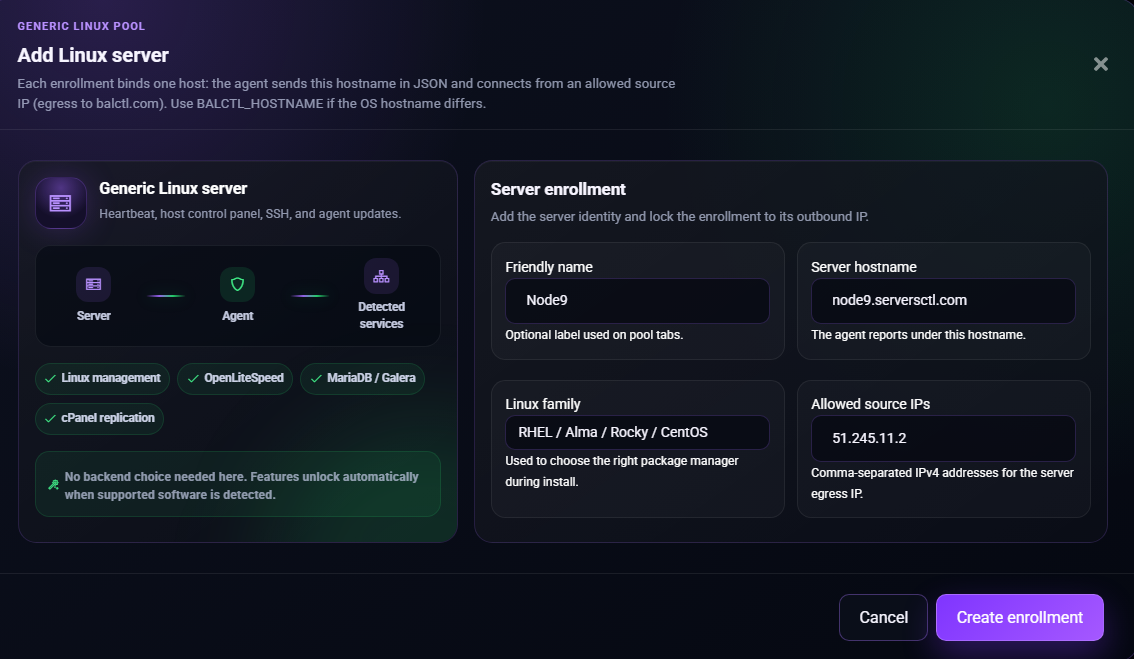
- Now, go to the pool. Pool Overview → Add server. Choose — RHEL/Ubuntu - Enter hostname, allowed egress IP.

- Click Create Enrollment" and copy the install command.
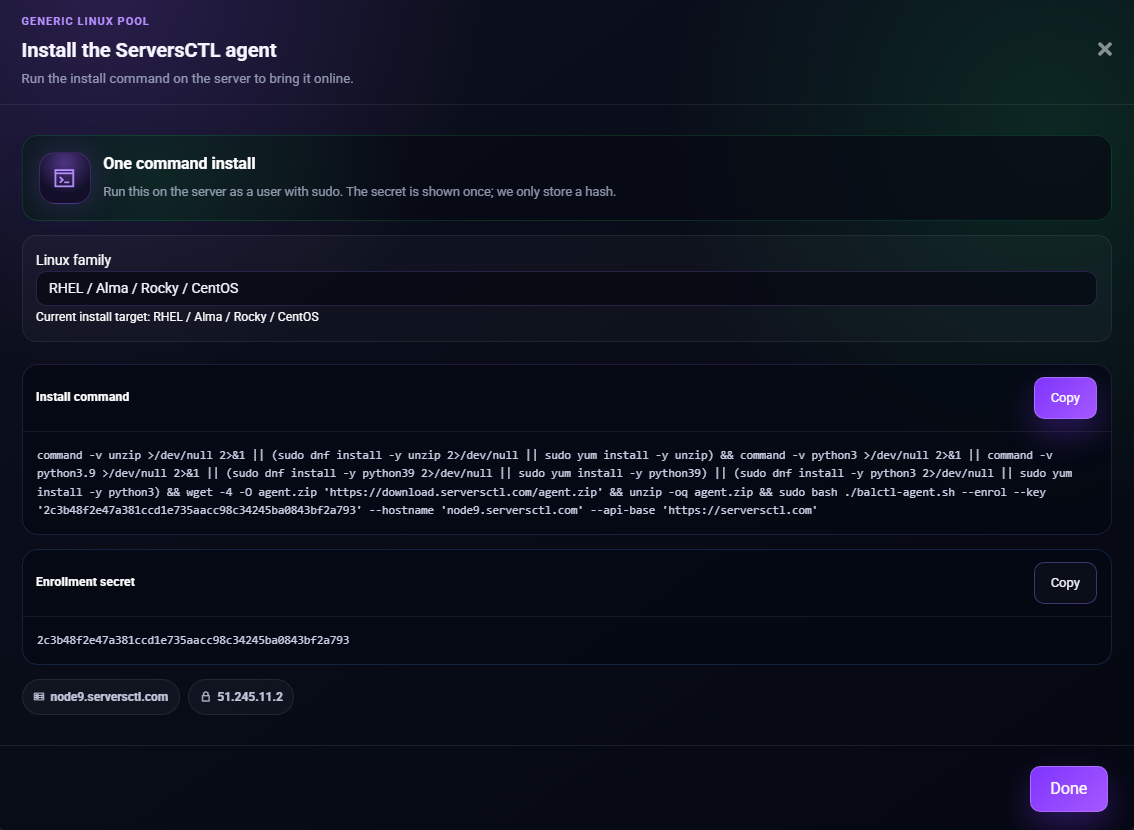
- On the VM:
- Paste the install command into the console to install the agent.
- If you have existing installs of cPanel, OpenLiteSpeed, MariaDB etc. The agent will report this to the UI.
- When 2+ members run cPanel: pool Protection and Managed DNS tabs appear (see Chapter 1).
- Optional: Configure DNS on Managed DNS for account-level cutover.
Add further members to the Pool
- From the pool overview tab click "Add Member".
- Name the member and supply the member's egress IP.
- Copy the install command into the console of the server being added to the pool.
- Repeat the process to add further members. There are no limits to the number of pools or members you may have.
How pool navigation works
Two layers on one screen

Protection and Managed DNS are pool settings. They float in the top tab bar above the member server tabs. They coordinate account replication, DNS cutover, and provider keys across the fleet — not operations on a single box.
Pool tab visibility (Generic Linux template)
Tab: Overview (first pool tab).
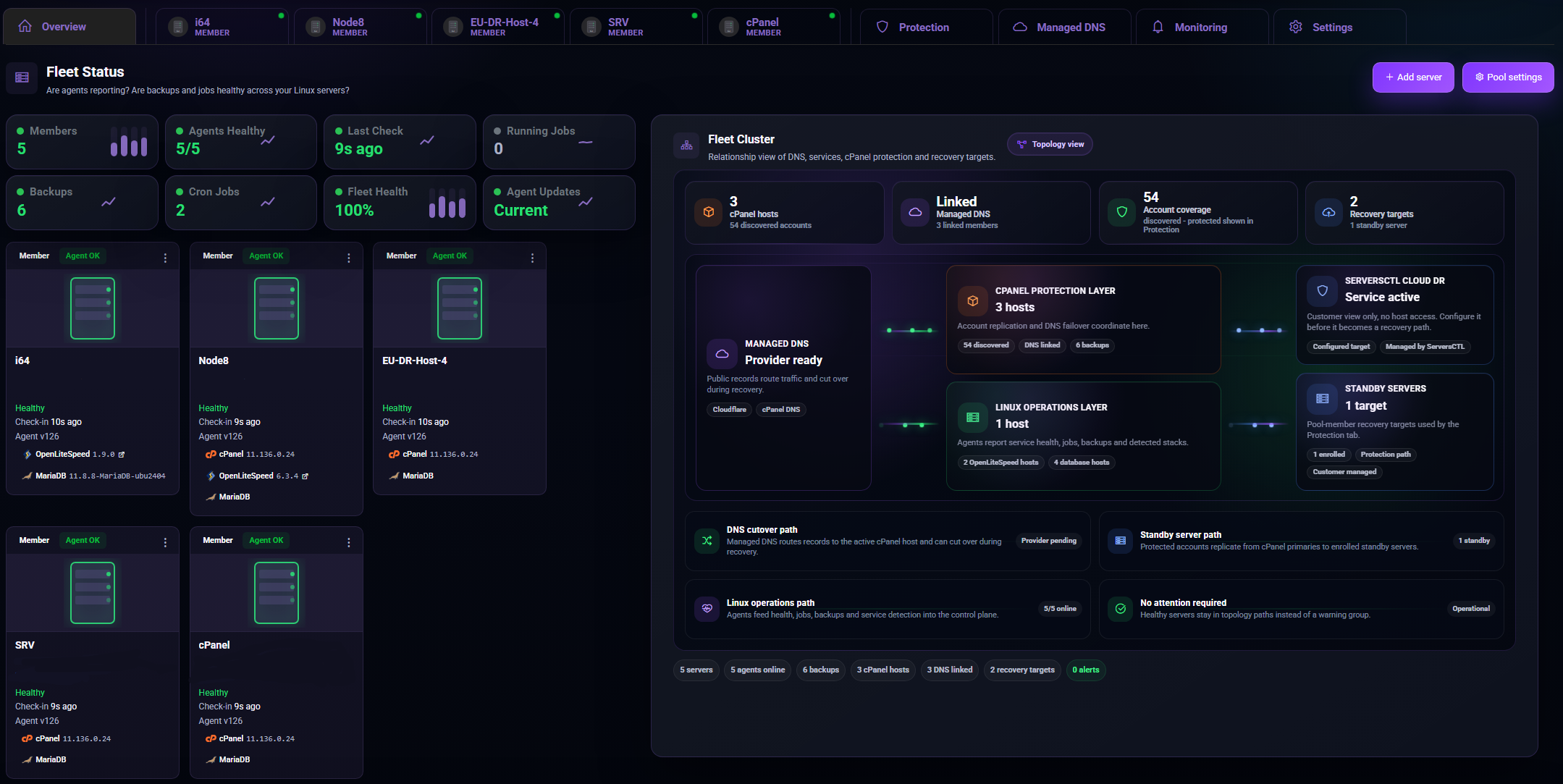
Purpose: Fleet-wide health — are agents reporting, are backups and jobs healthy across Linux servers?
What you see
Operator actions
- Add server — enroll another VM (see §18)
- Click a server tile or member tab — jump to that member’s Control panel
- Pool settings — shortcut to pool Settings tab
Tab: Protection (pool tab bar).
When visible: 2+ pool members where the agent reports cPanel.
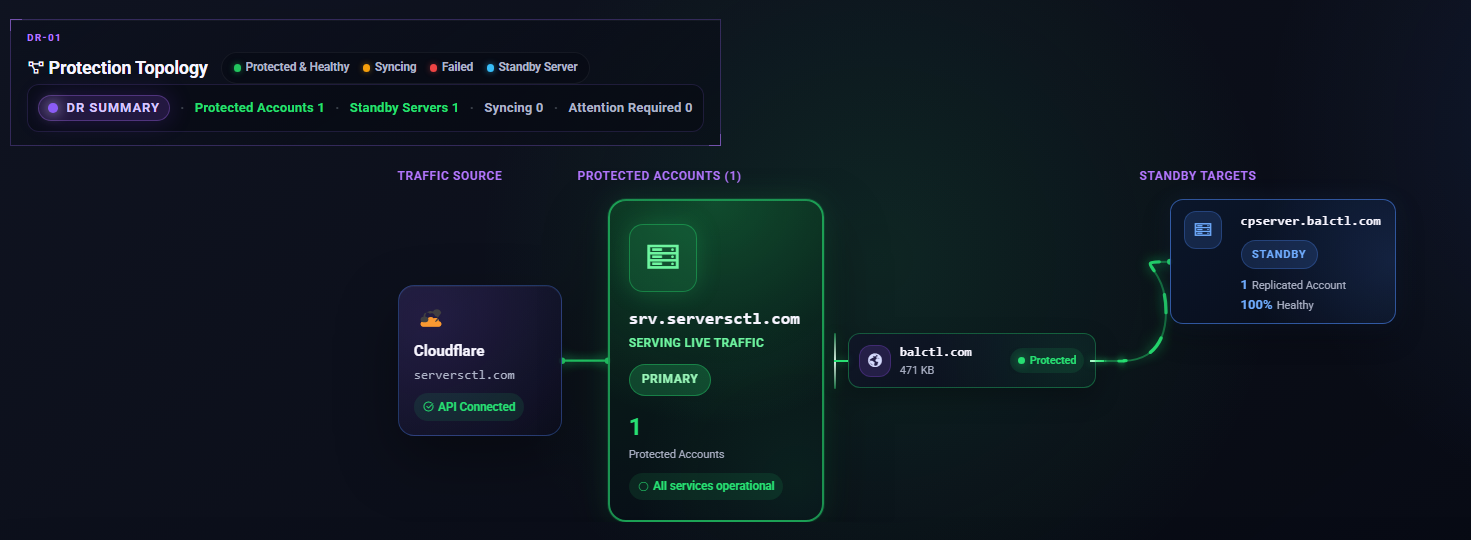
Purpose: Account-level warm standby — scheduled WHM backup → Secure Storage → restore on a standby server, with optional DNS cutover per protected account.
What you see
Operator workflow
- Ensure 2+ cPanel members and WHM API keys (Settings or Managed DNS → API providers).
- Add protection — pick source account, target standby member, schedule (
1h…1mo), DNS TTL, DNS provider (Cloudflare or WHM). - Replicate now / Replicate protected (Pro) — on-demand sync.
- Account Cut DNS — per-account A record swing to standby (coordinates with Managed DNS).
- After DNS cut: post-failover hook on standby.
Relationship to member tabs
Protection is pool-wide orchestration; member cPanel is per-server WHM operations.
Replication Transfer
Replication can take anywhere from a few minutes to several hours, depending on the size of the account.
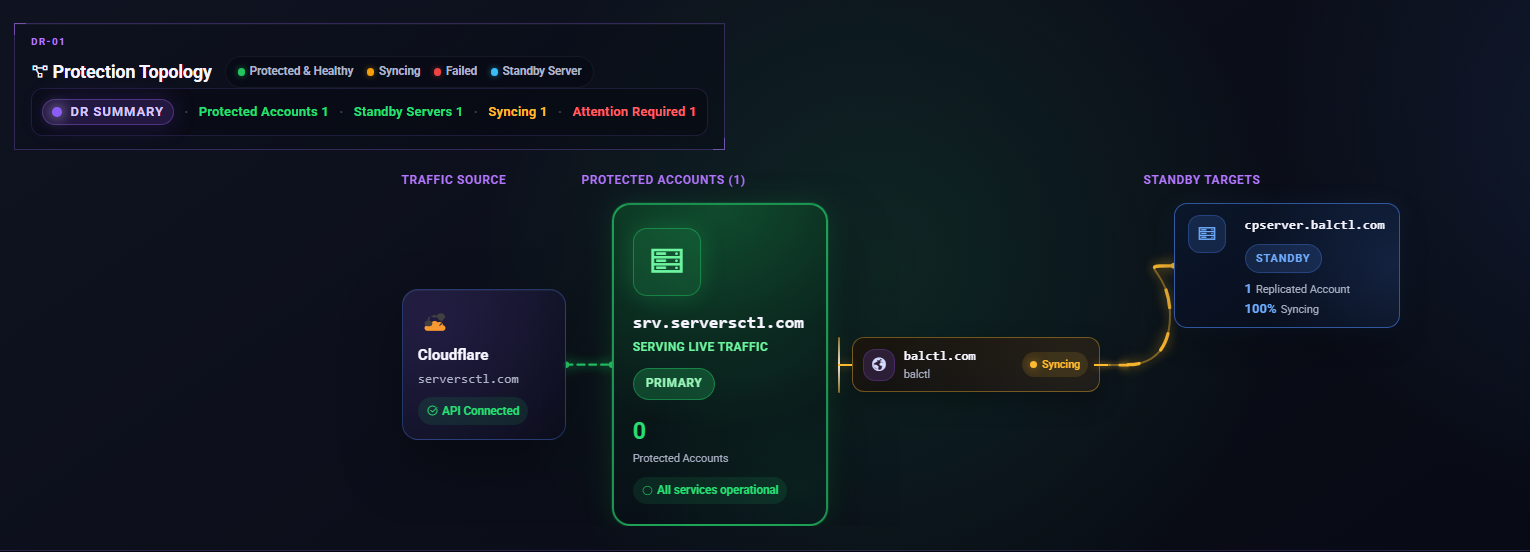
The source agent will package the account and split it into multiple chunks, which are securely stored temporarily in D2 storage. Once all chunks have been uploaded, the UI instructs the receiving agent to download them and begin the restore process.
After the restore has completed successfully, all stored chunks are automatically removed from S3. As a guide, a 1.8GB backup typically takes around 5 minutes to replicate. Please take replication time into account when configuring your schedule. If the account is large, you may need to replicate once per day or every few days to avoid overlap and ensure the process completes cleanly.
Tab: Managed DNS (pool tab bar).
When visible (Generic Linux): 2+ cPanel-detected members
Purpose: Pool-level DNS catalogue for protected accounts and optional dynamic DNS — WHM vs Cloudflare zones, record health, sync, import. The API keys listed here are for DNS only. Do not use your production WHM API key here. You must use Cloudflare or a cPanel DNS Cluster API Key.
What you see
Operator actions
- Connect Cloudflare and/or cPanel DNS API credentials
- Import existing Cloudflare records into the catalogue
- Sync WHM→CF after account changes on WHM
- Account Cut DNS from record rows (also available on Protection cards)
- Set failover hostname and enable DNS sync (when using pool-level cutover)
Protected DNS
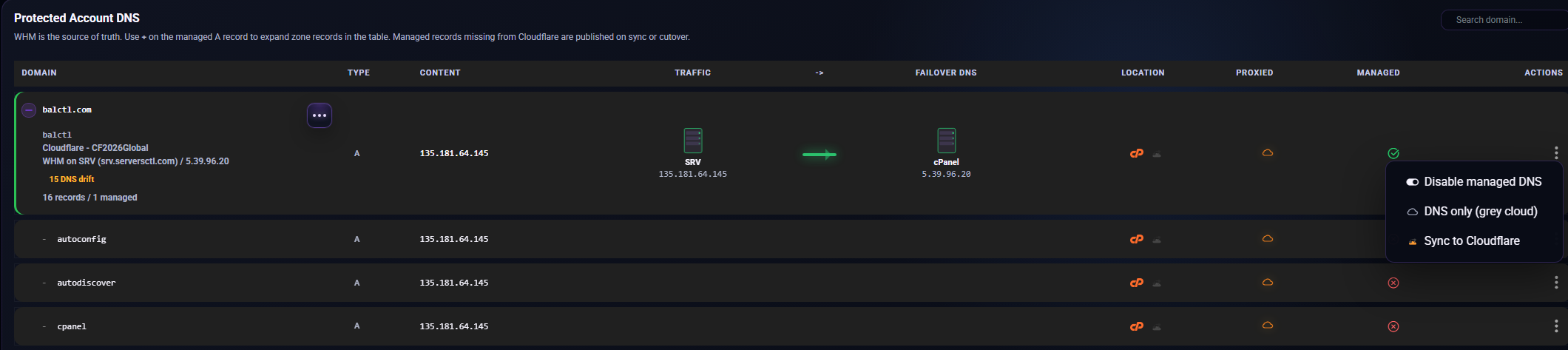
The UI treats WHM servers as the source of truth and replicates changes to any linked DNS provider, as long as the account is marked as Managed. By default, the only record that will cut over automatically is the domain’s A record.
Multiple DNS Record Cut Over
You can configure the UI to cut over additional DNS records from the Protected Account DNS list. From here, you can specify A, AAAA, MX, and SRV records that should automatically cut to a standby server when the primary becomes unavailable.
Actions
-
Disable Managed DNS – When disabled, DNS records will not be updated or cut over during failover.
-
DNS Only – During cutover, Cloudflare proxying will be disabled (grey cloud), ensuring a direct DNS‑level switch without CDN caching or WAF interference.
-
Sync to Cloudflare – If you’ve added new DNS records in WHM’s DNS Manager, they will appear in the Protected DNS table and can be automatically pushed to Cloudflare.
Pool vs member DNS
Tab: Monitoring (pool tab bar).
Purpose: Pool-wide monitoring presets — distinct from per-member alerts on each server’s Monitoring tab.
Generic pool without Protection (0–1 cPanel members)
Infrastructure alerts section:
- Heartbeat miss thresholds, CPU/disk/service alert toggles
- Optional alert email recipients (account + team inboxes)
Generic pool with Protection (2+ cPanel members)
Protection DNS failover section (in addition to or instead of infrastructure, depending on layout):
Operator note
Configure per-member heartbeat and resource alerts on each server’s member Monitoring tab. Pool Monitoring is for fleet-level and protection DNS behavior.
Tab: Settings (pool tab bar).
Purpose: Pool identity, shared API credentials, danger zone.
What you see (Generic Linux)
What is NOT on the Generic pool Settings
HAProxy pools include Balancer failover on Settings.
Part 2 - Member workspace (per-server tabs)
Member tab bar (Generic Linux Server Pool)
Member Control Panel
Purpose: Host-level operations on this Server — OS family, uptime, services, quick actions, TLS.
What you see
Member Security
Tab: Security.
Purpose: Host firewall and SSH on this member.
What you see
Member OpenLiteSpeed
Tab: OpenLiteSpeed.
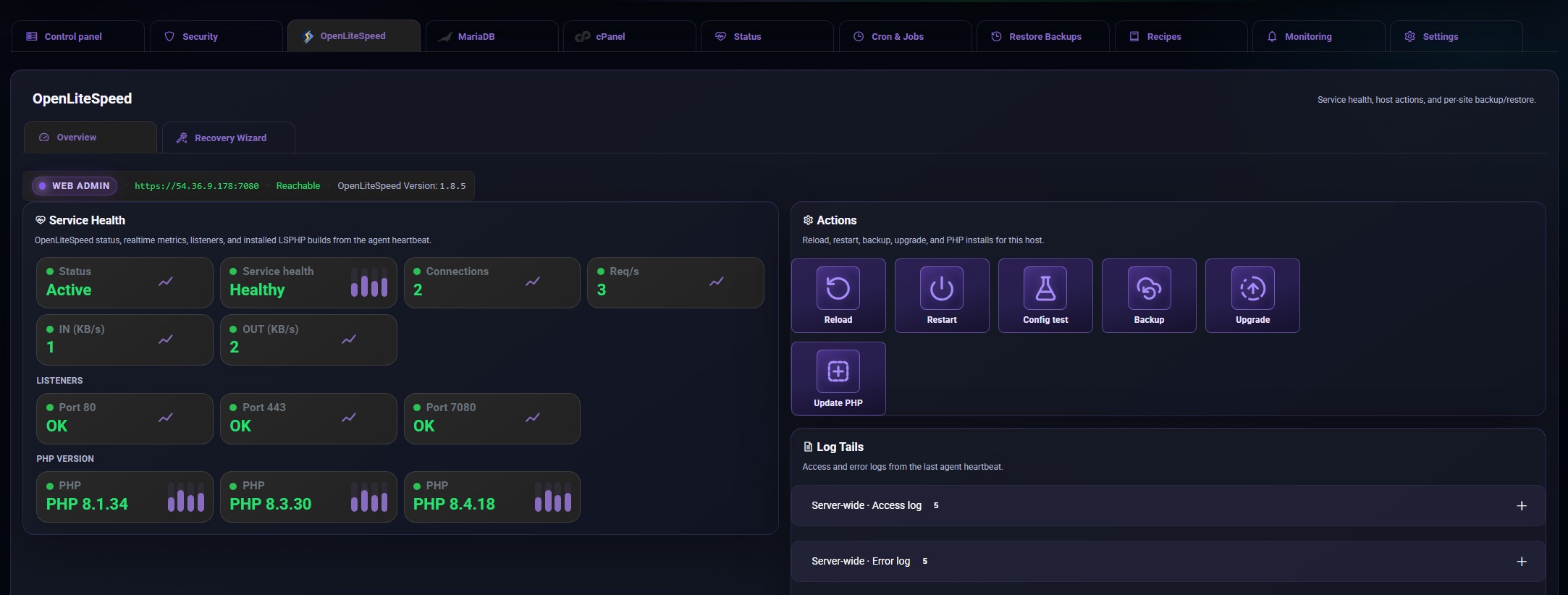
Sub Tabs: Overview, Recovery Wizard
For: VMs where OpenLiteSpeed is the web server — standalone OLS hosts.
Not for: Default cPanel/Apache hosting — expect a not-detected overlay on cPanel servers.
Overview
Web admin (:7080 link), KPIs, virtual hosts table, reload/restart/config test/backup/upgrade/LSPHP, logs.
Recovery Wizard
Also known as Cross‑Member Restore, this feature allows you to automatically take a full backup of an OpenLiteSpeed account, including SSL certificates and the database*. The backup is stored within your Pool API Storage, and the Recovery Wizard allows you to restore that backup to a different OpenLiteSpeed server.
If you have a DNS API Key scoped for the domain, DNS records can be updated automatically during the recovery process. Simply select the appropriate API Key when using the Recovery Wizard.
* Database restoration requires that no additional MySQL/MariaDB password is set when accessing mysql from the command line. If an additional password has been configured, the automated restore process cannot proceed, and the database will need to be restored manually.
Recipes & backups
Install OpenLiteSpeed, Harden OpenLiteSpeed on Recipes. Restore on Restore Backups (backup_openlitespeed, Pro).
Member MariaDB
Tab: MariaDB.
Subtabs: Overview, Databases
For: Dedicated DB servers or cPanel-managed MySQL on WHM hosts.
Standalone database server
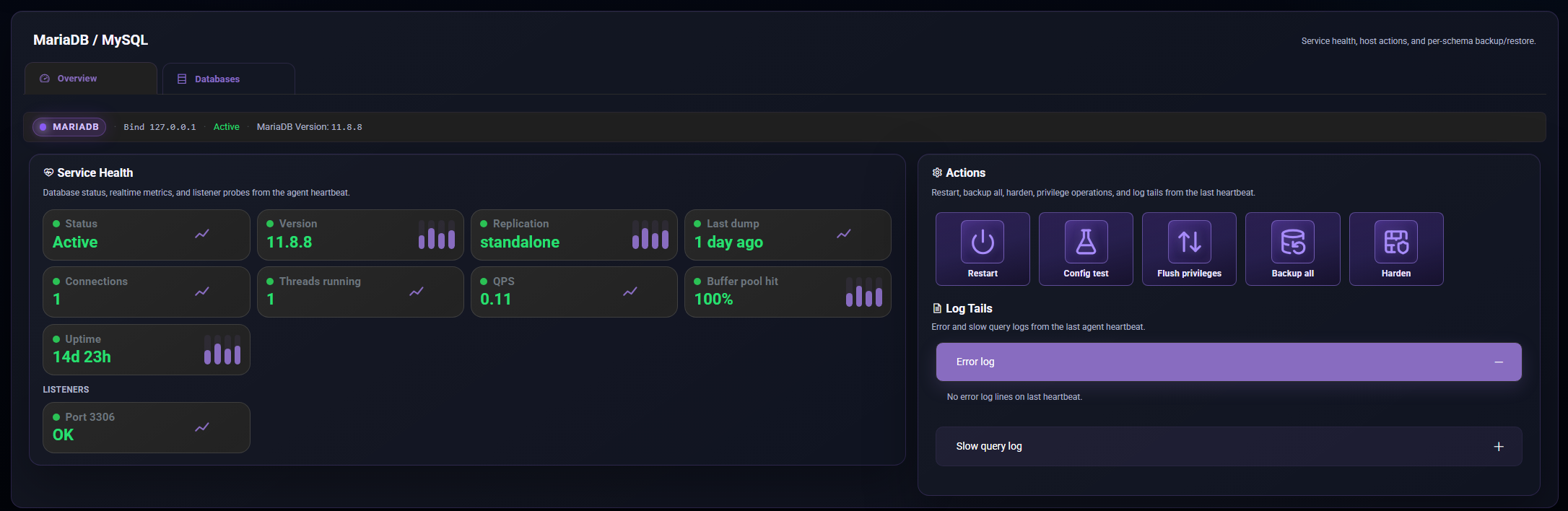
Overview
Health, KPIs, schema cards, restart, config test, flush privileges, logical backup, harden, logs.
Databases
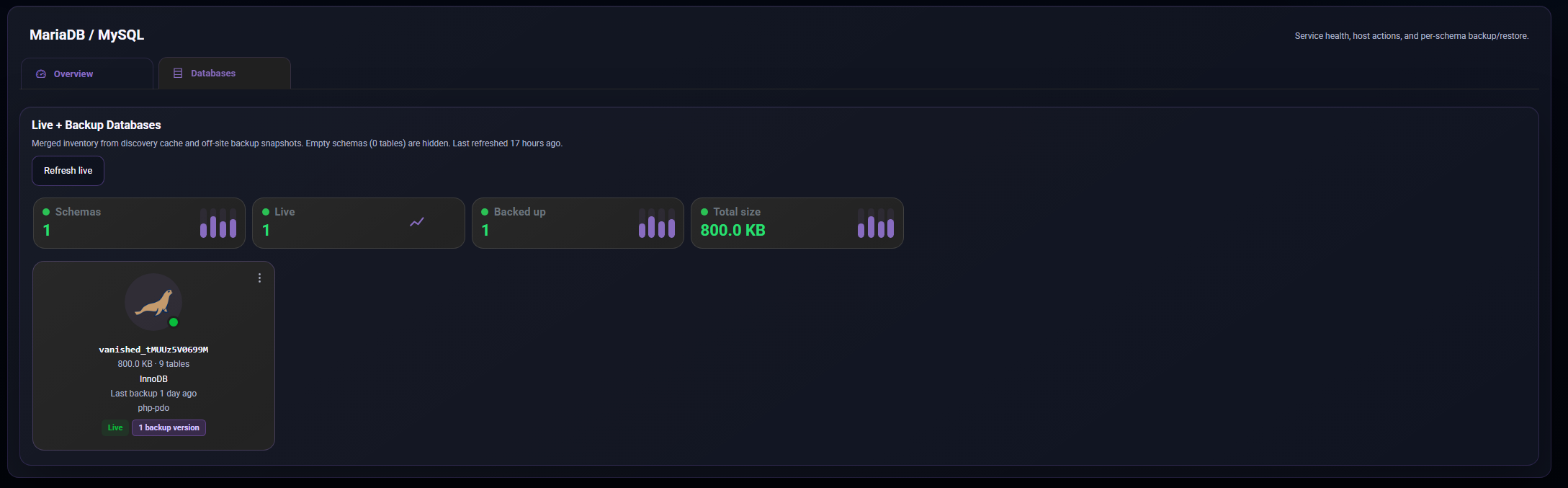
The Databases tab lists all databases discovered on the OpenLiteSpeed server. Databases are detected by scanning for common configuration files such as wp-config.php and parsing their contents.
Databases can be backed up individually or via cron. For a full account backup, use the Recovery Wizard.
cPanel-managed MySQL
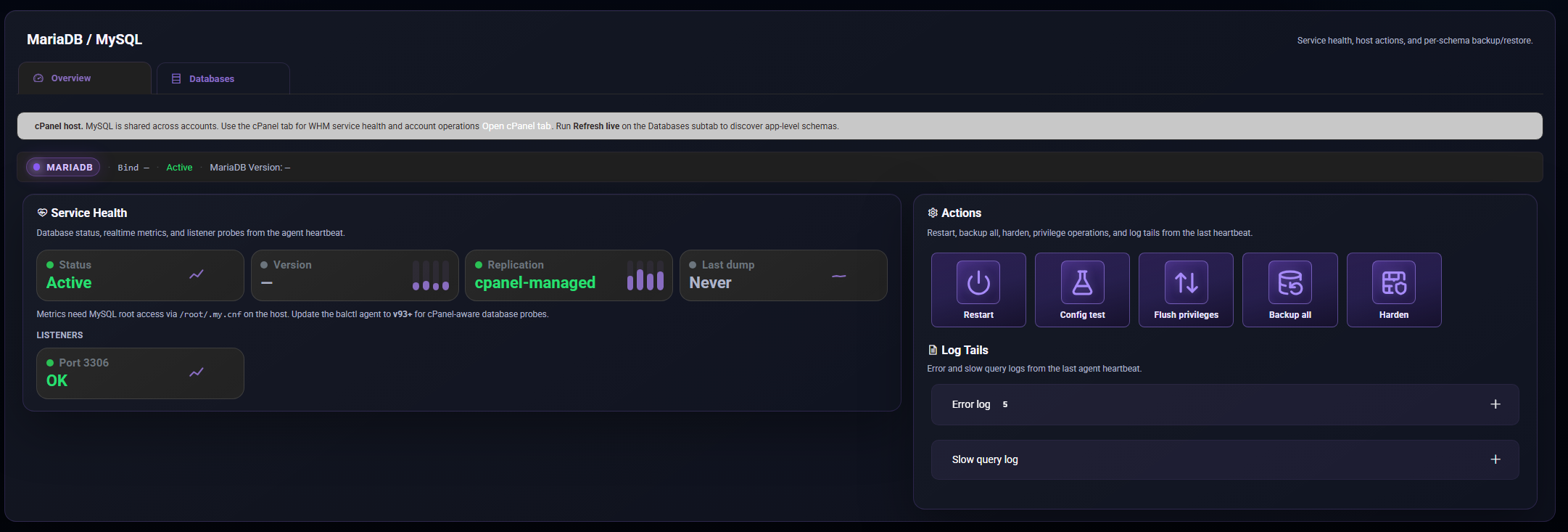
If cPanel is on the same host: MariaDB tab shows a cPanel host notice — use member cPanel (§11) for account-level DB ops.
Galera (wsrep) (In Alpha)
When Galera is enabled, the agent will report the wsrep state. ServersCTL does not run quorum, SST, or writer election. DNS is active ≠ Galera primary.
Recipes & backups
Install MariaDB/MySQL, Harden the database. Restore Backups. Advanced recipes require Pro.
Member cPanel
Tab: cPanel.
For: WHM servers — the most common ServersCTL hosting workload.
Inner tabs: Overview · Operations · Accounts · Migrate & Recovery
Overview (inner)
Operations (inner)
Restart web/mail/cPanel, config check, WHM backup, harden, WHM API status, listeners, disk, metrics.
Accounts (inner) (Pro)
CRUD, suspend, terminate, backups, AutoSSL, one-time login. Free: read-only, 5 accounts cap.
Live Migrate & Recovery (inner) (Pro)
Live transfer, sessions, push copy. Bulk replication and schedules: pool Protection (§3), not this inner tab alone.
WHM Binding
Full WHM API when member matches pool host. Run WHM link check recipe after DNS connect.
Member Status
Tab: Status.
Purpose: Read-only health and readiness snapshot for this member.
Generic Linux member
Member Cron & Jobs
Tab: Cron & Jobs.
Purpose: Scheduled tasks on this member and visibility into recent job activity.
What you see
Common presets
Stack backups (backup.cpanel, backup.database, etc.), failover.evaluate where applicable.
Member Restore Backups
We are developing off-site backups. We currently only backup configuration unless stated in the UI. Contact us if you have questions.
Tab: Restore Backups.
Purpose: Snapshot catalog for this member — run backup, restore, delete.
Modes
Tab adapts to detected stack: cpanel, openlitespeed, database, or mixed.
Pro required for restore actions on stack backups.
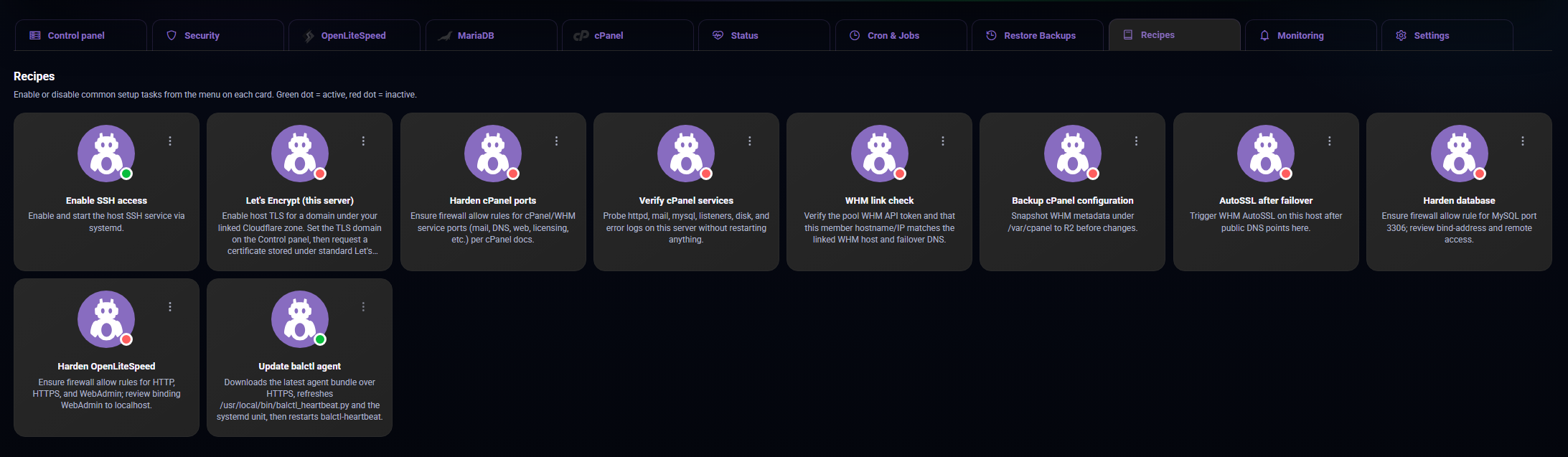
Member Recipes
In development - Only ever use recipes on clean servers.
Tab: Recipes.
Purpose: Guided install and harden flows — one-click enqueue of multi-step agent jobs.
Examples by stack
Member Monitoring
Tab: Monitoring
Purpose: Per-member alert settings.
What you configure
Member Settings
Tab: Settings (member tab bar).
Purpose: Identity and location for this enrolled server.
What you see
WHM API keys for cPanel: prefer pool Settings / Managed DNS API providers; per-member WHM edit is available there.