HAProxy Server Pools
- Overview & concepts
- Create your first pool & Enroll your first member
- Pool workspace (Overview, Settings, DNS, DR, Monitoring)
- Pool members & enrollment
- DNS failover & traffic cutover
- HAProxy operations
- Backups & disaster recovery
- Recipes & scheduled jobs
- Agent reference
- Troubleshooting & FAQ
Overview & concepts
What is an HAProxy pool?
An HAProxy pool is a ServerCTL deployment preset for the edge tier: public DNS, one or more enrolled Linux VMs running HAProxy, and optional automatic promotion when the active host fails.
ServerCTL is the control plane. It does not terminate customer traffic itself. It:
- Enrols VMs via the ServersCTL agent
- Publishes a managed A record through Cloudflare or cPanel/WHM
- Tracks heartbeats (~1s check-ins) and systemd HAProxy health
- Queues remote jobs (install, reload, backup, drain) that run on the next heartbeat
Status: HAProxy pools are well tested and in public beta.
Core terminology
Architecture (high level)
Health for failover: A member is unhealthy when:
- No heartbeat within the failover delay window (10–120 seconds), or
- HAProxy is monitored, and systemd reports HAProxy inactive
Important: Clients must use the failover hostname, not a member’s raw IP. ServerCTL moves the A record; your apps keep the same DNS name.
What HAProxy pools include vs other presets
HAProxy pools uniquely enable:
- Remote HAProxy jobs (install, reload, backup)
- HAProxy systemd probe on member cards
- Disaster Recovery tab (cross-member restore, 2+ members)
- Traffic-flow diagram on Overview
- HAProxy Status tab
Generic Linux pools hide HAProxy-specific jobs unless the agent detects HAProxy on the host.
Create your first pool & Enroll your first member
Create your first pool
Step 1 — Add pool
- Go to Pools → Add pool
- Choose the HAProxy template
- Name the pool (e.g.
production-edge) - After create, you land in the pool with a setup banner
Step 2 — Connect DNS (Settings)
ServerCTL needs API access to authoritative DNS to create/update the failover A record.
Cloudflare
- API token: Zone · DNS · Edit (+ zone read)
- Cloudflare Account ID
- Select the zone that will host your public hostname
cPanel / WHM
- WHM hostname and port (usually 2087 or 443)
- WHM username + API token
- Zone domain (apex), e.g.
example.com
You can save reusable Cloudflare credentials under Settings → API providers and link them to pools without re-entering tokens.
Step 3 — Enrol the first member
On Overview → Add member:
After creating, copy the one-shot install command immediately and run it in the HAProxy Server — the enrollment secret is shown once.
The command:
- Downloads the agent bundle
- Runs
balctl-agent.sh --enrol --key … --hostname … - Writes
/etc/balctl/agent.env - Installs and starts
balctl-heartbeat.service
Within a few seconds, the member tab should show a green heartbeat.
Step 4 — Set the public failover hostname
Settings or Managed DNS tab:
- Set DNS label (e.g.
lb→lb.example.com) - Choose orange-cloud (proxied) vs DNS-only as needed
- On Overview, Make active on the member that should receive traffic
Step 6 — Add a standby (High Availability)
Repeat enrollment on a second VM. Enable Automatic failover in Settings when ready for unattended promotion.
Pool workspace (Overview, Settings, DNS, DR, Monitoring)
Pool workspace
The pool page has a tab bar with three groups:
- Overview (pool home)
- Member tabs (one per enrolled host)
- Pool tools (DR, Monitoring, Settings, Managed DNS)
Overview tab
For HAProxy pools, Overview answers:
- Is traffic on the active node?
- Are standbys ready?
- Will DNS move if HAProxy or the agent fails?
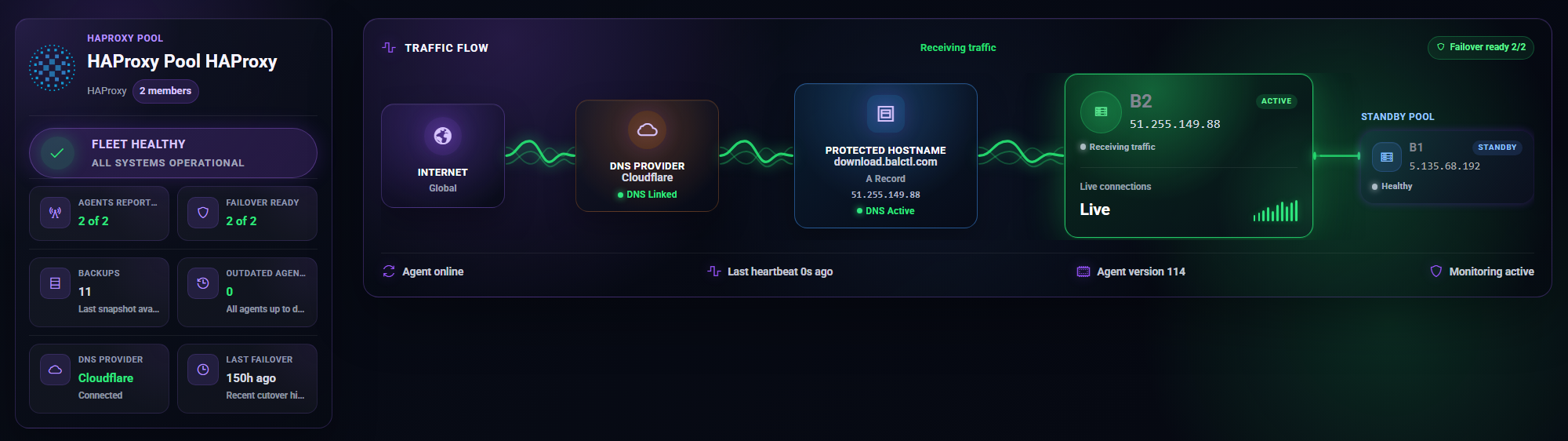
Hero panel: Traffic-flow diagram — Cloudflare/DNS → active HAProxy → standbys.
Actions:
- Add member
- Cut DNS to standby — manual DNS cutover to next ready standby (requires connected DNS)
- Settings shortcut
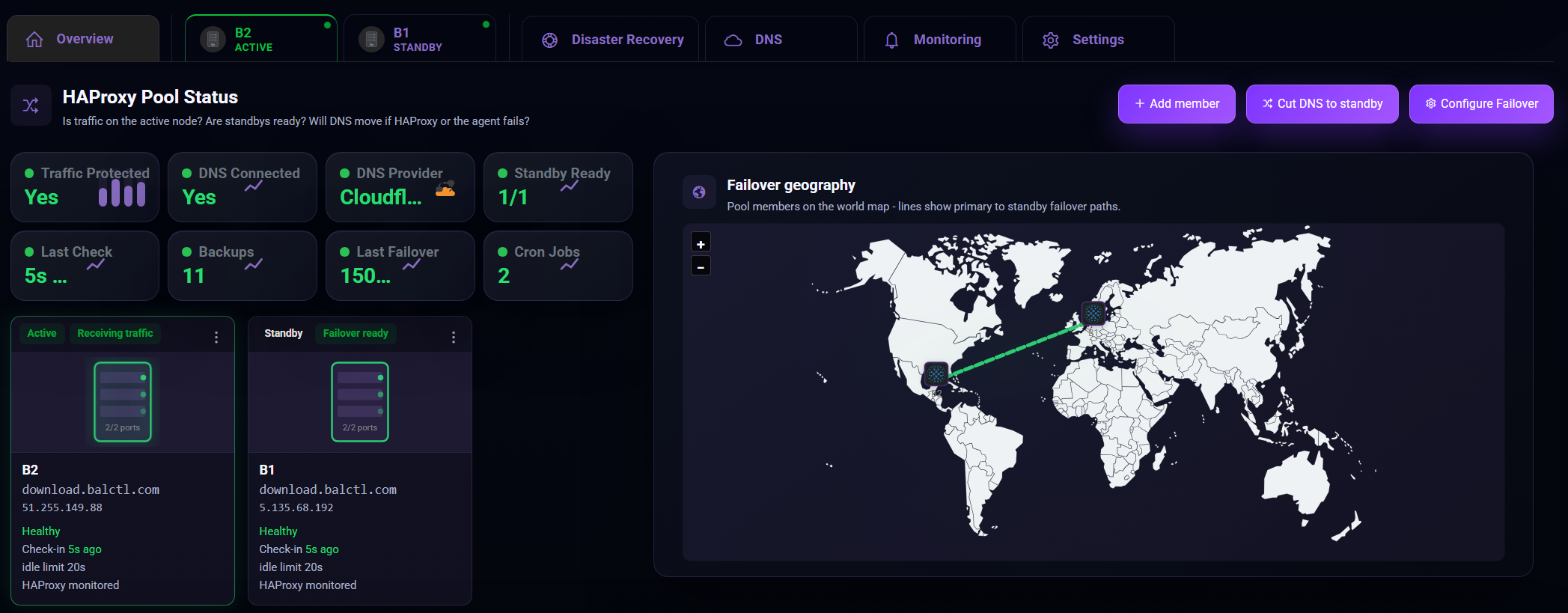
KPI tiles: healthy members, failover-ready count, backups, cron jobs, last failover time.
Member cards show Active vs Standby, heartbeat state, and Make active on standbys.
Settings tab
Failover hostname, proxied vs DNS-only, and Dynamic DNS sync live on the Managed DNS tab (not only Settings).
Managed DNS tab
- Failover DNS label and FQDN preview
- Orange cloud vs DNS-only
- Dynamic DNS sync — optional; updates A record when active member’s public IPv4 changes on heartbeat
- DNS connectivity test
- Current A record target IP
Disaster Recovery tab
Visible when the pool has 2+ members (HAProxy preset only).
Cross-member restore: Pick a target member, choose a snapshot from another host’s backups, restore scoped HAProxy files onto the target.
Requires Pro or active trial for cross-member restore.
Monitoring tab
Pool-wide alert settings and failover notification preferences (email when auto-failover promotes a standby).
Per-member monitoring is under each member’s Monitoring tab.
Protection tab
Only appears when 2+ cPanel members exist — not core HAProxy-only pools. Document separately if you mix cPanel hosts into an HAProxy pool.
Pool members & enrollment
Member tab layout
Click a member in the tab bar to open its workspace. Sub-tabs:
HAProxy-specific Management actions (install, reload, drain, TLS failover) are surfaced on Control panel and via Recipes — the dedicated HAProxy tab exists in code but is hidden until product-ready.

Enrollment security model
Each heartbeat must satisfy:
- Bearer token — 48-character enrollment secret (hashed in D1)
CF-Connecting-IP— must match allowed source IP(s)- JSON
hostname— must match enrolled hostname
Mismatch → 403 (IP) or credential errors.
Agent environment
Agent runs as root for HAProxy install, backup/restore, admin socket, and cert writes.
DNS failover & traffic cutover
Manual cutover
Make active on a standby member → ServerCTL sets it as primary and updates the managed A record to its public IPv4.
Cut DNS to standby on Overview → promotes next failover-ready standby (same DNS update, overview-oriented workflow).
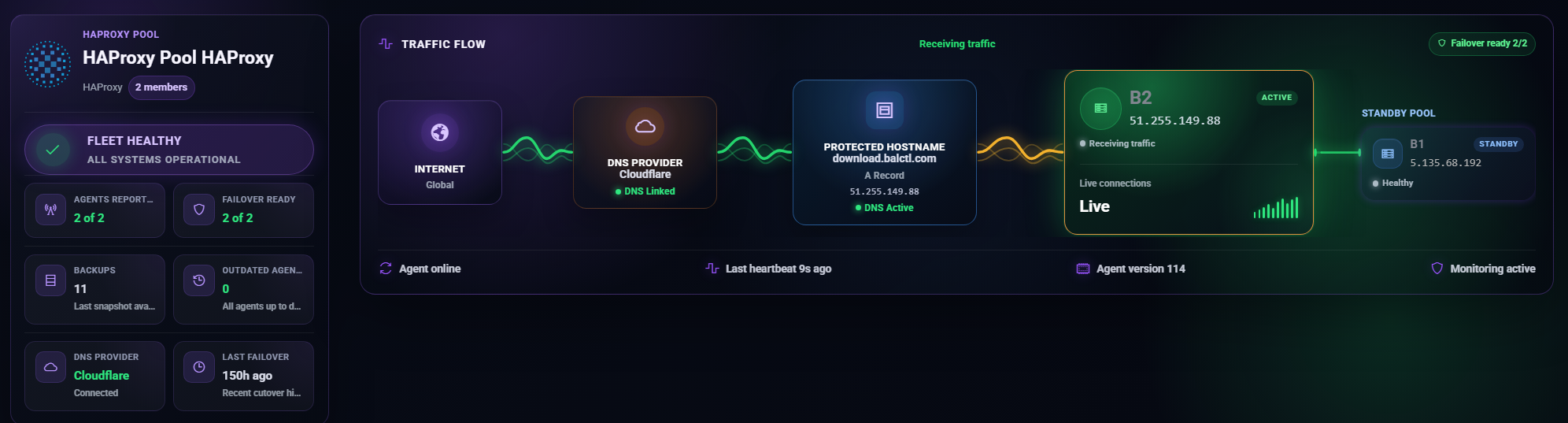
Automatic failover
Enable in Settings → Balancer failover.
When enabled, ServerCTL periodically evaluates the active member. Promotion triggers when:
- Heartbeat age exceeds failover delay, or
- HAProxy is monitored and inactive
A healthy standby is promoted; DNS is updated; optional email alert fires.
Failover delay
Agents' heartbeat independently (~1s); failover delay is not the heartbeat interval.
Failover-ready criteria
A standby is ready when:
- Recent heartbeat within the failover window, and
- HAProxy is not down (when monitored)
Dynamic DNS Sync
Optional for HAProxy pools when the active member’s WAN IPv4 changes (DHCP/ISP churn). Each heartbeat can push the new public IP to Cloudflare without manual DNS edits.
Proxied vs DNS-only
- Orange cloud (proxied): Traffic through Cloudflare; good for HTTP/S when origin IP hiding matters.
- DNS-only (grey cloud): Clients connect directly to member IPv4 — required for raw TCP services (e.g. non-HTTP on custom ports).
HAProxy operations
Install & lifecycle
Jobs are enqueued to the API; the agent claims and runs them on the next heartbeat.
Admin stats socket (drain / ready)
Runtime backend control requires a Unix admin socket in haproxy.cfg:
stats socket /run/haproxy/admin.sock mode 600 level admin expose-fd listeners
stats timeout 2m
Enable via Recipe: Enable HAProxy admin stats socket or Enable admin stats socket action.
Requires socot + agent as root. This is not a public HTTP stats page.
Backend server states
From Management/topology table:
TLS (Let’s Encrypt on HAProxy)
Recipe: Let’s Encrypt (failover / HAProxy)
- Uses DNS-01 via Cloudflare for the pool failover FQDN
- Agent writes combined PEM:
/etc/haproxy/certs/<hostname>.pem - One-time operator step: add
ssl crt /etc/haproxy/certs/<hostname>.pemin config, validate, reload - Renew from Management or cron preset
tls.acme_renew_force
The pool must have Cloudflare linked and a failover label set before the recipe applies.
Status tab
Shows live traffic from agent heartbeat enrichment — not a duplicate of the Overview topology diagram. Use for session rates, backend health columns, etc.
Backups & disaster recovery
What gets backed up
HAProxy backup job captures:
/etc/haproxy/haproxy.cfgandconf.d/*.cfg/etc/haproxy/certs/*- Let’s Encrypt material under
/etc/letsencrypt/ - Paths referenced by
ssl crtin config under/etc/ - Optional UFW rules (
backup.ufw) — separate job
Storage: Per member S3.
Path pattern:
Restore flows
Same member: Restore Backups tab → pick snapshot → scoped restore → agent validates with haproxy -c → reload.
Cross-member (DR tab): Restore another member’s snapshot to a target VM — typically after an outage or a bad config push.
Fresh VM rebuild:
- Enrol new/replacement member
- Optional: Install HAProxy
- Restore snapshot
- Make active when ready
Standby provisioning
Provision standby from backup clones, HAProxy config from a backup onto a standby host — faster than manual copy for DR drills.
Recipes & scheduled jobs
Recipes (member → Recipes tab)
Recipes show steps, completion state, and optional disable actions (e.g. remove admin socket lines).
Cron & Jobs tab
Control-plane cron (UTC) enqueues jobs on the next agent heartbeat.
Common presets:
- HAProxy backup
haproxy.reload- TLS force renew
failover.evaluate(pool-level failover check)
Separate from per-member backup schedule on Restore Backups — both can exist.
Job timeline
All agent jobs appear in Cron & Jobs with status: pending → running → completed/failed. Remote actions from Overview cards also enqueue here.
Agent reference
Heartbeat payload (HAProxy-relevant)
The agent sends JSON including:
ip— declared/probed IPv4hostnamehaproxyblock — monitored, active, topology, listeners, optionalshow statsummary
ServerCTL validates IP against enrollment and stores the latest row per node.
CLI essentials
sudo balctl_heartbeat.py --version
sudo balctl_heartbeat.py --provision-haproxy # local install
sudo balctl_heartbeat.py --update # from configured agent.zip URL
sudo journalctl -u balctl-heartbeat.service -f
Job loop
POST /api/agents/heartbeat- Server returns pending jobs
- Agent executes, posts
POST /api/agents/jobs/complete
Full agent docs: agents/README.md in the repo.
Troubleshooting & FAQ
Support bundle: If contacting support, include the pool name, member hostname, journalctl excerpt, screenshot of member health badge.